Evals
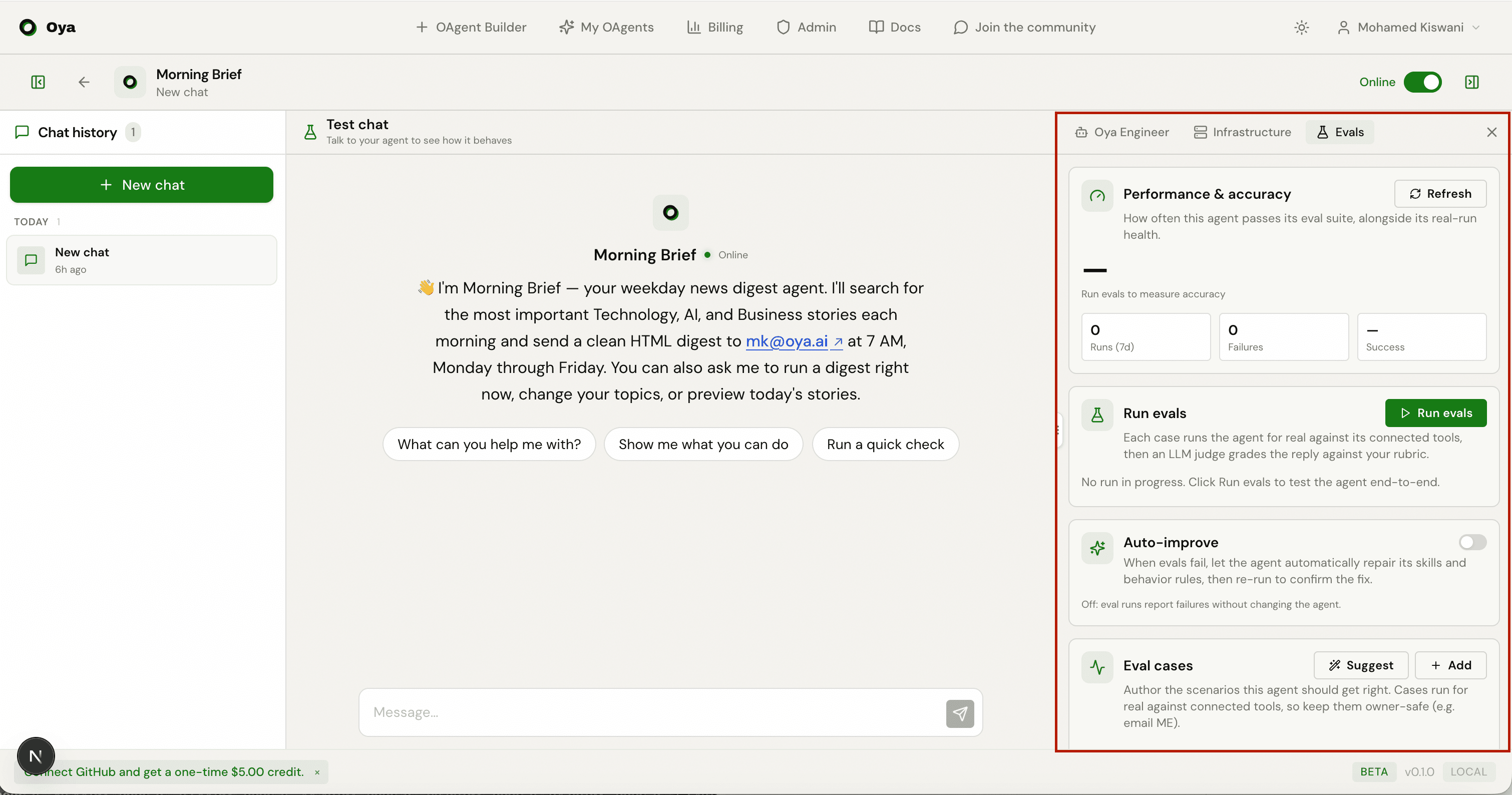
Write test cases for your OAgent, run them for real against its connected tools, and watch each one pass or fail with a score and reason.
Overview
Evals are how you measure whether an OAgent actually does the right thing. You author a set of test cases (each is a message the user might send plus a rubric for what a correct outcome looks like), then run them. Every case runs the OAgent end-to-end against its real, connected tools, and an LLM judge grades the reply against your rubric. You get a per-case pass or fail, a score, the reason, and the exact skills that fired.
The Evals tab lives on the chat/OAgent page at /chat/{agentId}. You can also reach it from Run evals in the builder. Under the hood the tab calls the routes under /api/agents/{id}/evals/*.
Eval Cases
An eval case is one test scenario. Each case has a message (what the user types), a rubric (one line describing what a correct, useful outcome looks like), an optional list of expected skills (the tool names it should call), and a set that tags it as either happy path or edge.
- Happy path: a realistic request the owner would make that the OAgent must handle well. List the skill(s) it should call, and a rubric for the correct outcome.
- Edge / guardrail: an out-of-scope request, one missing key info, or something the OAgent should decline or ask a clarifying question about. Expected skills is usually empty; the rubric describes the correct restraint.
Every case can be toggled enabled or disabled (only enabled cases run), edited, or deleted. Cases carry a source: ones you write are marked customer, and ones seeded from the mission are marked generated (shown with a “suggested” badge).
Authoring a case
Click Add in the Eval cases section to open the inline form. Enter the message, a rubric, and pick Happy path or Edge / guardrail, then Save. A concrete example:
- Message: "Summarize today's signups and email ME the list."
- Rubric: "Pulls today's signups and sends a clear summary email to the owner."
- Set: Happy path, expected skill: the email-sending skill.
Auto-Generate Cases
Click Suggest to seed a starter suite from the OAgent's mission and spec. It produces both a happy set and an edge set, and every generated scenario is constrained to owner-safe targets so running it has a small blast radius. Suggested cases are deduplicated against your existing messages, so clicking Suggest again will not pile up duplicates.
Running Evals
Click Run evals to run every enabled case. The run streams live: you see a status line as each case starts, then a row per case with a check or cross, the set tag, the message, the judge's reason, and the skills that fired. If you have no saved cases, the run falls back to a generated starter suite so the button still works. Use Stop to abort a run in progress.
Each run is persisted with a total, a passed count, a score, and a pass rate. Grading is strict: a case hard-fails if the run errors or a skill fails, or if a happy-path case with expected skills called none. Otherwise the LLM judge scores the reply against your rubric. Recent runs are listed at the bottom of the tab with their pass rate and timestamp, plus an auto-fix badge when auto-improve made changes during the run.
Auto-Improve
The Auto-improve toggle changes what happens when evals fail. It is stored on the OAgent at agents.config.auto_improve.
- Off: eval runs report failures without changing the OAgent. One pass through the cases, then done.
- On: a failing run triggers an automatic fix-and-retry loop: skills that errored are regenerated, behavior rules are revised for non-tool failures, and the suite re-runs to confirm the fix (up to a few rounds).
Summary & Production Stats
The Performance & accuracy section at the top of the tab gives you two readings at a glance: how the OAgent does on its eval suite, and how it is doing on real work.
Eval accuracy
The large percentage is the pass rate of your latest run, with a “3/4 eval cases passed” caption. A score-trend sparkline shows the pass rate across recent runs, and the tab tracks how many cases you have authored.
Production run stats
Alongside eval accuracy, the summary shows real-run health over a window (24h, 7d, or all): total runs, failures, how many are running now, success rate, and average duration. These count real work only.
- Builder test runs are excluded: only production runs are counted.
- A run counts as a failure if its status is failed, or if it exited silently with a non-zero exit code.
- Success rate is (total minus failures) over total; average duration is measured from start to completion.
API Endpoints
Everything the tab does maps to routes under /api/agents/{agent_id}/evals:
GET    /api/agents/{agent_id}/evals/summary          # latest score, trend, case count, production stats
GET    /api/agents/{agent_id}/evals/cases            # list eval cases
POST   /api/agents/{agent_id}/evals/cases            # create a case
PATCH  /api/agents/{agent_id}/evals/cases/{case_id}  # edit / enable / disable a case
DELETE /api/agents/{agent_id}/evals/cases/{case_id}  # delete a case
POST   /api/agents/{agent_id}/evals/cases/generate   # auto-generate suggested cases from the mission
POST   /api/agents/{agent_id}/evals/run              # run enabled cases (streamed, SSE)
GET    /api/agents/{agent_id}/evals/runs             # list past runs
PUT /api/agents/{agent_id}/evals/settings # toggle auto-improve[DONE] marker.