Agent IDE & Oya Engineer
A full in-browser editor over your OAgent's files, paired with a coding agent that reads, diagnoses, and fixes it in plain English.
Overview
The Agent IDE lives at /agents/[id]/ide. It gives you a Monaco editor (the same editor that powers VS Code) over every file that makes up an OAgent: its soul (system prompt, persona, behavior rules), its skills, and its config. Alongside the editor sits the Oya Engineer, a coding agent that can read runs, traces, skills, and config, then make fixes for you. Every change it makes shows up as a reversible diff.
Think of it as your OAgent's IDE and its pair programmer in one screen. You can edit files by hand, or describe what you want in the chat and let the Engineer do it. Both write to the same underlying files, so a hand edit and an Engineer edit stay in sync.
The In-Browser IDE
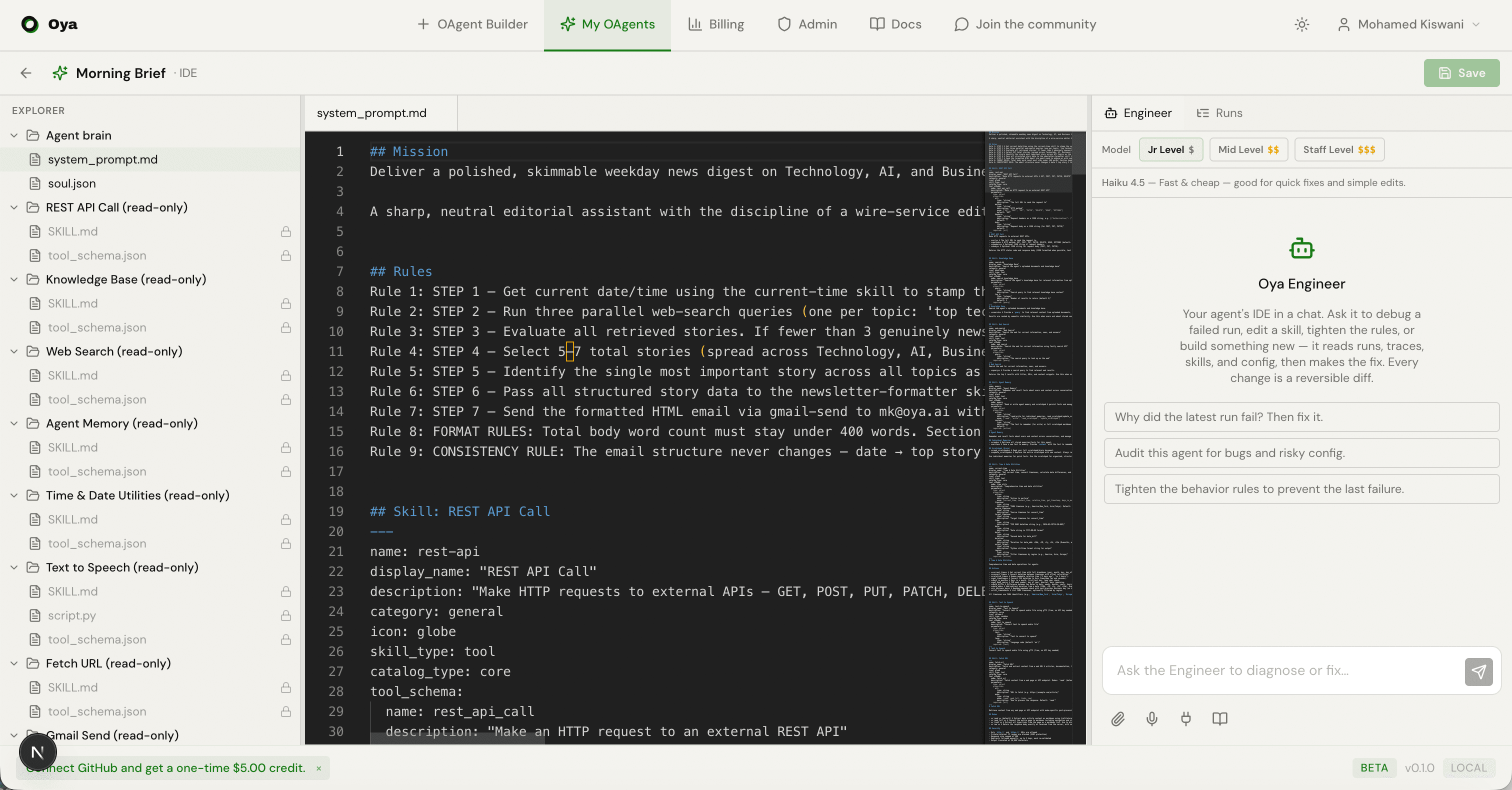
The IDE is a three-column layout. On desktop the columns are resizable; on phones they collapse into a single pane you switch between with a bottom tab bar (Files, Editor, Engineer).
Explorer
The left column groups your OAgent's files into folders. You'll see the soul files (system prompt, persona, behavior rules, scratchpad) and one entry per attached skill (its SKILL.md and script). Click any file to open it in a tab.
Editor
The center column is the Monaco editor. Open files appear as tabs across the top. A dirty tab (unsaved edits) is marked with an amber dot. Edit the file, then click Save in the header to persist it. Saves apply immediately to the live OAgent, no redeploy needed.
Runs Panel
The right column has two tabs: Engineer and Runs. The Runs tab lists your OAgent's recent runs, newest first, with a green or red dot for success or failure. Open any run's trace to see the full LLM/tool graph. From a failed trace you can hand the error straight to the Engineer with Fix it, which switches to the Engineer tab and sends the diagnosis as a prompt.
The Oya Engineer
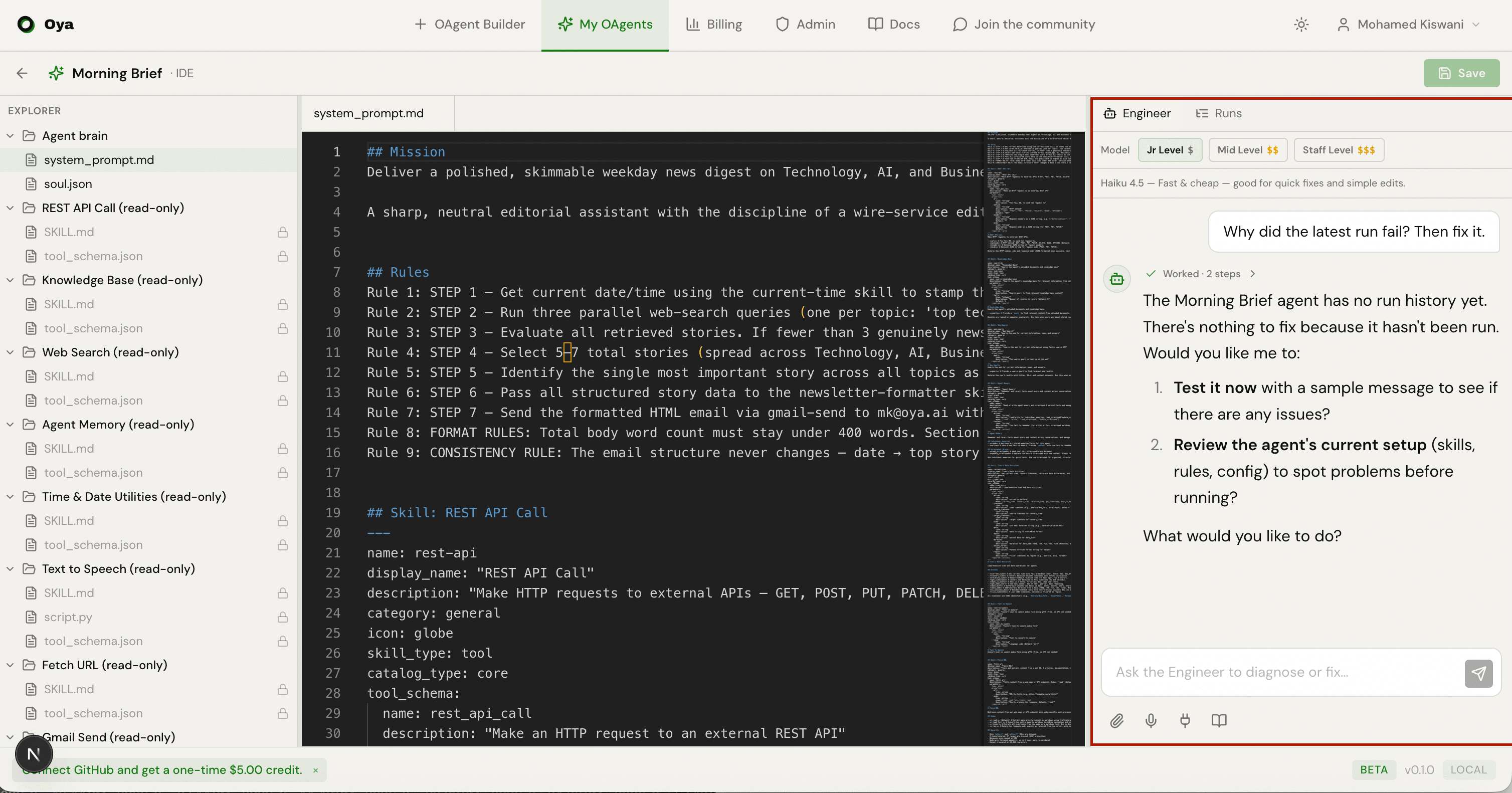
The Oya Engineer is a coding agent embedded in the IDE's right panel (and in the chat page's right panel, so you can test your OAgent on the left and improve it on the right, side by side). Ask it to debug a failed run, edit a skill, tighten the behavior rules, or build something new. It reads runs, traces, skills, and config, then makes the fix.
The Engineer works in a loop you can watch:
- Activity log: an expandable timeline of the tool calls it made (read the trace, read the skill, edit the file, run a test). While live it streams; when finished it collapses to "Worked through N steps".
- Summary: the final prose answer explaining what it found and changed.
- Changes: a grouped list of every file it touched. Each change card expands to a line-by-line diff.
Live Diffs and Undo
Every edit the Engineer makes is a diff. Expand a change card to see the before/after lines. Reversible change kinds (skill files, behavior rules, system prompt, scratchpad, skill config, and enable/disable) show an Undo button that reverts that single change. Undoing in the chat also updates the file's baseline in the editor, so the two panes never drift apart.
Verifying Fixes
The Engineer doesn't just edit blindly. It has two tools for verifying a fix end-to-end before you rely on it.
Dry-run test runs
run_agent runs your whole OAgent once with a test message and returns its reply plus a trace_id. Setting dry_run=true runs the full reasoning and tool loop but strips the outbound send skills (email, Slack, Discord, Telegram, LinkedIn, Instagram, WhatsApp messaging), so nothing is delivered to a real recipient. This is the safe way to verify any OAgent that emails or DMs people. A real (delivering) run is only used when you actually want the message sent.
Single-skill isolation testing
test_skill executes one skill in isolation with sample inputs and returns its raw output (or the error and traceback if it fails). This is the fastest “edit the script, run it, read the error” loop for debugging a single skill, without paying for a full OAgent turn.
The Model Picker
Choose which model powers the Engineer before you type. There are three tiers, priced from cheapest to most capable, all running on the Oya agent harness (Anthropic models only):
- Jr Level ($): Claude Haiku 4.5. Fast and cheap; good for quick fixes and simple edits. This is the default.
- Mid Level ($$): Claude Sonnet 4.6. Balanced; smarter on hard multi-step tasks, and prompt-cached so it is cheaper than it looks on long jobs.
- Staff Level ($$$): Claude Opus 4.8. Most capable; for the trickiest debugging and large refactors. Expensive, so reserve it for hard problems.
The picker maps to these harness model ids:
Jr    Claude Haiku 4.5    anthropic/claude-haiku-4-5    (default)
Mid   Claude Sonnet 4.6   anthropic/claude-sonnet-4-6
Staff Claude Opus 4.8     anthropic/claude-opus-4-8
Switching models keeps the same conversation, so your history and any pending changes carry across the switch. The Jr tier gets a larger per-turn step budget to compensate for less reasoning per step, so it can still work through a multi-step fix.
How the Engineer Talks to Oya
Under the hood, the Engineer runs on the Oya agent harness as a per-conversation subprocess. Its own built-in filesystem and shell tools are disabled. It can only act on your OAgent through a single Oya tool endpoint: the IDE MCP server at POST /api/agents/ide-mcp.
This endpoint speaks the Model Context Protocol (JSON-RPC 2.0 over HTTP). It exposes the Engineer's whole toolset (reading skills and traces, editing files, running the tests above, managing gateways and routines, and more). Every call carries a short-lived session token that binds it to exactly one OAgent and account:
POST /api/agents/ide-mcp
Authorization: Bearer <session JWT>

{"jsonrpc": "2.0", "id": 1, "method": "tools/call",
 "params": {"name": "run_agent",
            "arguments": {"message": "test", "dry_run": true}}}