Billing
Transparent pricing in plain dollars.
Overview
Oya bills in plain US dollars. No tokens, no credits, no hidden multipliers. You see exactly what each action costs.
How Billing Works
Oya uses a prepaid balance model. Add funds via Stripe, and they are deducted per usage. A signup bonus is provided for new accounts so you can start building immediately.
Cost Breakdown
There are three cost types on the platform:
LLM Calls
Per-token pricing based on the model used. The exact cost of each LLM call is shown in the Run Tree per step, so you can see exactly where your money goes.
Per-Model Pricing
Each usage record shows the model name used for that call. Cost varies by model — lighter models like Gemini Flash cost significantly less than larger models. The model is displayed on each billing record so you can see exactly which model generated each charge.
Sandbox Execution
Per-second pricing based on compute (vCPU, RAM, storage). Typically fractions of a cent per run.
Tool Calls
Small per-call fee for built-in tools (web search, HTTP API, etc.).
Free Credits
New accounts receive a signup bonus. You can also earn a one-time $5.00 credit by connecting your GitHub account in Settings. The credit is added to your balance automatically after connecting.
Low Balance Warning
When your balance drops below $1.00, a red warning banner appears in the app footer showing your current balance. Clicking it opens the Add Credits dialog. At $0.00, agents stop responding entirely.
Viewing Usage
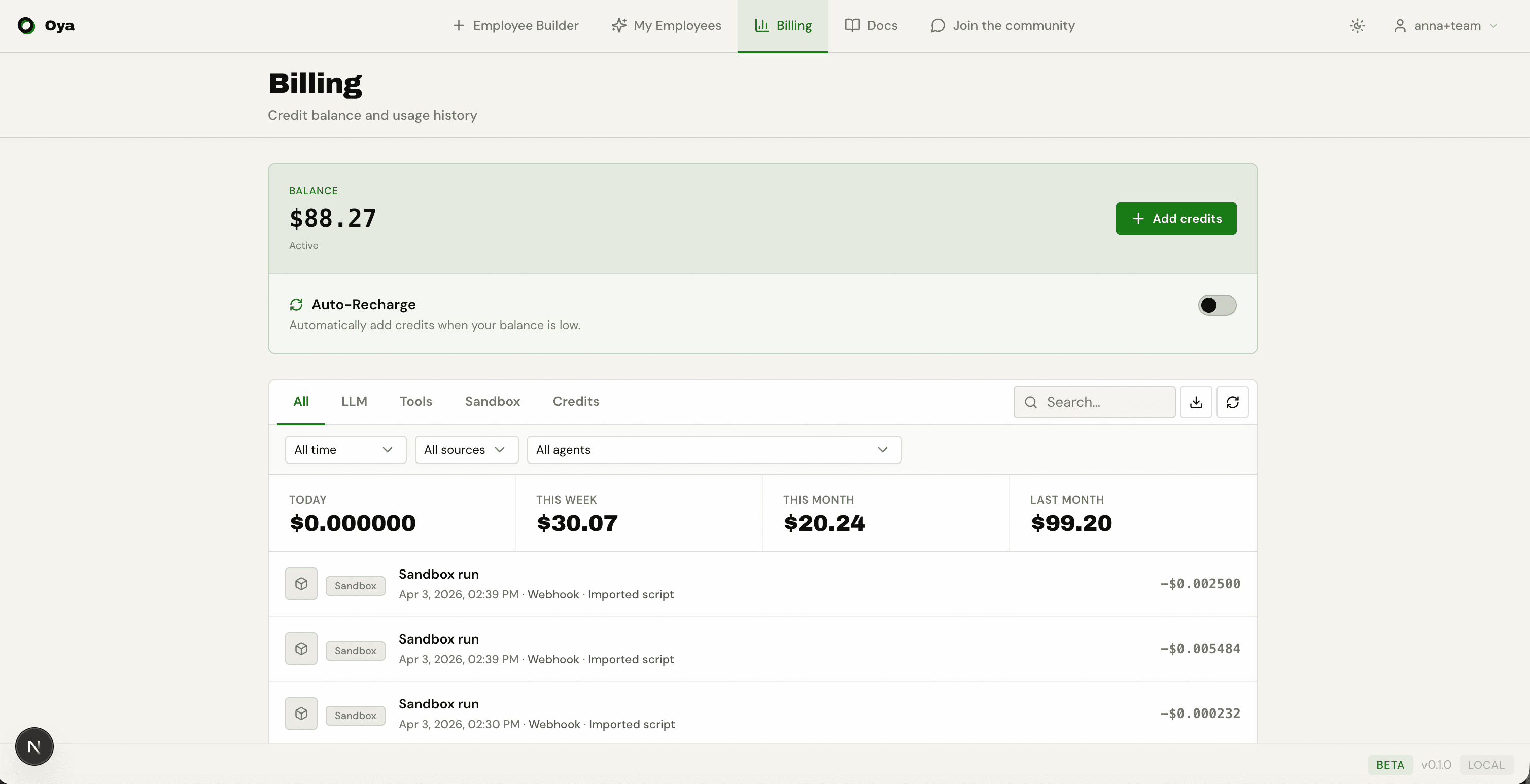
The /billing page shows your current balance, usage statistics cards (today, this week, this month, last month), and a detailed usage history table.
Filtering & Search
The usage table supports multiple filters:
- Type filter — Show All, LLM, Tools, Sandbox, or Credits records.
- Text search — Search by model name or agent name.
- Agent filter — Dropdown to show usage for a specific agent only.
- Pagination — 50 records per page with Previous/Next navigation.
Record Details
Each usage record shows the exact dollar amount charged. Additional details vary by type:
- LLM records — Show prompt tokens and completion tokens.
- Tool records — Show the tool name (web_search, fetch_url, gmail_send_email, etc.).
- Sandbox records — Show compute duration.
Adding Funds
Payments are handled via Stripe as one-time payments (not subscriptions). The minimum amount is $1.00. Funds appear in your balance instantly after payment.
Cost Optimization Tips
- Use cheaper models (e.g., gemini-3.5-flash) for simple tasks.
- Minimize behavior rules — each rule adds to the system prompt (more input tokens).
- Use the Run Tree to identify expensive steps and optimize.
- For repetitive tasks, use automation scripts (import Python) instead of LLM-driven assistants.